How to repair an STL file online
STL Repair is a free online STL fixer for checking models before 3D printing. It counts open edges and repairs a single missing triangular face on an otherwise consistent mesh. Processing runs on your device, with no account or file upload required.
- Choose or drop up to 10 ASCII or binary STL files for inspection.
- Check the open-edge count and select files marked as repairable. Click Repair selected.
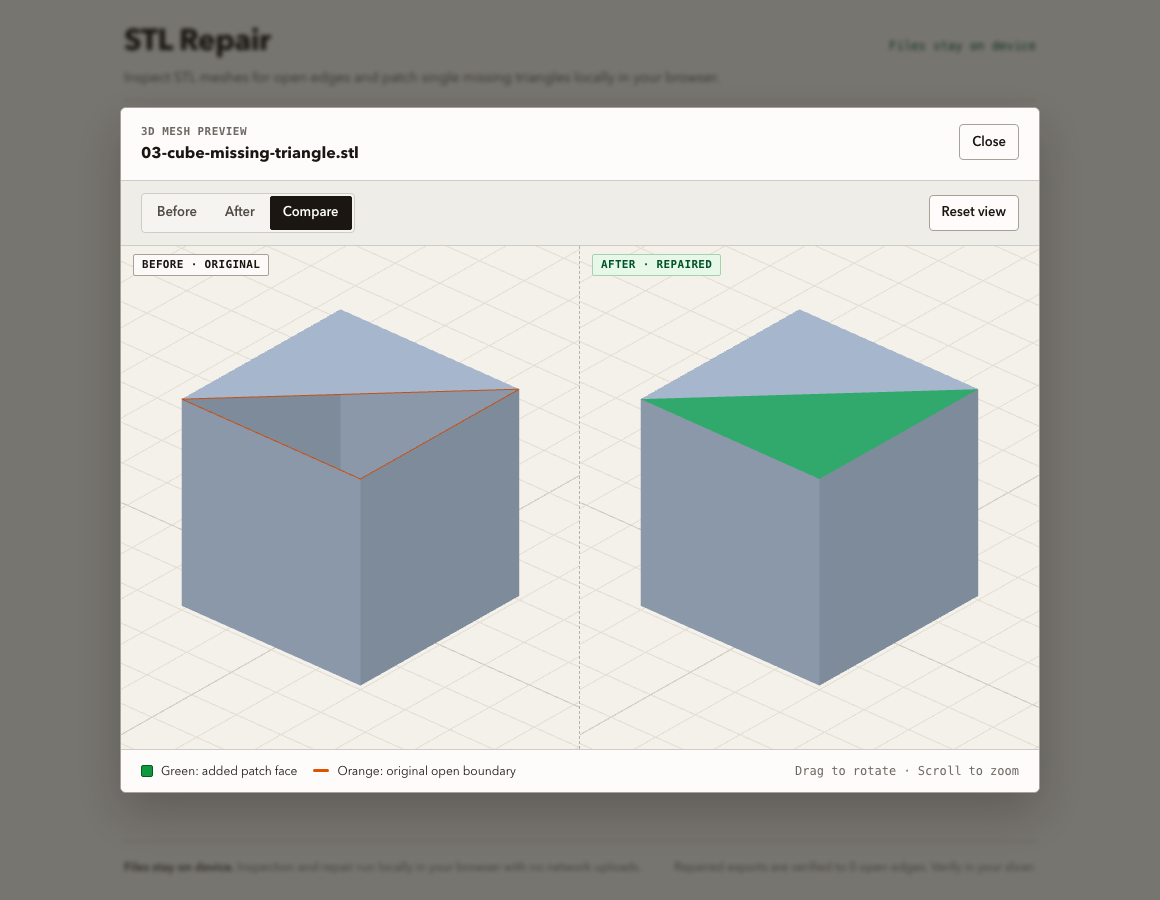
- Open Preview and select Compare to inspect the patch. Download the repaired binary STL and verify it in your slicer.
Example: a cube with one missing triangle
Try the sample STL. The original cube has 11 triangles and 3 open edges. The repaired export has 12 triangles and 0 open edges. In Compare, an orange outline shows the original opening and a green triangle shows the patch.
What does an open edge mean?
An open edge belongs to only one triangle. Three connected open edges can mark the boundary of a single missing triangular face.
Which STL problems does automatic repair handle?
Automatic repair fills one eligible triangular opening and checks the exported mesh for zero open edges. Larger or multiple holes and non-manifold edges can be flagged for inspection. Use a mesh editor for those repairs and a slicer to check printability.
Can I use STL Repair on a Mac?
Yes. Use a modern browser on macOS, Windows, or Linux. The 3D preview requires WebGL. Each STL file can be up to 20 MiB and contain up to 100,000 triangles.